
Managing appointments should be simple, but public agencies and high-traffic offices face constant operational chaos instead. Whether handling DMV appointment scheduling, clinic bookings, or city-service visits, endless lines and chronic delays signal fundamental breakdowns in appointment management systems.
Many teams still wrestle with phone calls, walk-ins, emails, and manual logs, fragmented systems that collapse instantly when demand surges unexpectedly.
The good news is that modern appointment scheduling software and online appointment scheduling tools eliminate these bottlenecks entirely.
This blog dissects the five most common appointment scheduling disasters and provides practical, implementable solutions that restore operational efficiency to your office immediately.
5 Common Challenges in Appointment Scheduling
Managing appointments sounds easy, but in busy public offices it quickly turns messy. Here’s a quick look at the most common issues teams face, and what steps you can take to fix them.
Challenge 1: Double-Booking and Overlapping Appointments
Double-booking is one of the most common issues in DMV appointment scheduling and other public-sector environments. It creates immediate bottlenecks, long waits, and frustrated citizens, all because two or more people end up assigned to the same time slot. This challenge usually appears in teams using manual tools or outdated systems that can’t sync availability in real time.
Why It Happens
Double-booking usually comes from manual scheduling, disconnected calendars, or outdated tools that don’t update instantly. If clerks and online systems aren’t sharing real-time availability, two appointments can slip into the same slot without anyone noticing. This leads to unnecessary delays, crowding, and frustrated visitors.
How to Fix It
To eliminate overlapping appointments, organizations should build a scheduling system that updates itself and prevents errors before they happen:
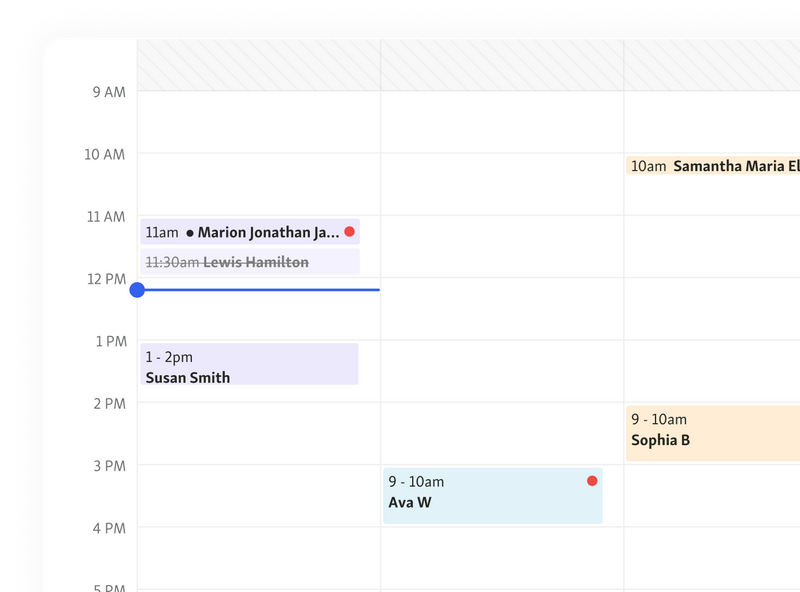
Use appointment scheduling software with real-time syncing
Every update, new booking, cancellation, or time change, applies across all devices instantly, ensuring staff and citizens always see accurate availability.
Automate availability and slot allocation
Let the system automatically open or close time slots based on staff capacity, appointment length, and service type, removing human error during busy hours.
Add buffer time between appointments
Add small gaps (3–5 minutes) to reduce running behind schedule and ensure appointments don’t stack on top of each other.
Turn on conflict detection and booking locks
Modern systems prevent staff from saving overlapping bookings and block citizens from selecting already-filled time slots online.
Challenge 2: High No-Show Rates
High no-show rates sabotage daily operations, burn staff hours, and punch massive holes in appointment scheduling, particularly devastating for DMV appointment scheduling and similar public services. When citizens vanish without warning, operational flow crashes, efficiency tanks, and punctual visitors endure unnecessary delays. Understanding no-show triggers enables targeted elimination strategies.
Why It Happens
No-shows plague agencies because people forget appointments scheduled weeks out, memory fails everyone eventually. Others bail after encountering cryptic instructions, document confusion, or hearing horror stories about eternal waits. Many citizens get stuck with inconvenient time slots but can't reschedule easily, so they ghost instead.
How to Fix It
Crushing no-shows requires communication, flexibility, and automation baked into your appointment scheduling software:
Send automated SMS/email reminders
Fire notifications 24-48 hours pre-appointment, killing forgetfulness dead. Include time, location, check-in steps, required documents, zero surprises allowed.
Offer flexible rescheduling options
Let citizens reschedule online instantly without phone tag nightmares. Frictionless rescheduling means people update plans instead of disappearing.
Provide clear pre-visit instructions
Send document lists, parking maps, check-in procedures via reminders. Clarity prevents confusion-triggered cancellations.
Use waitlist features that instantly fill canceled slots
Cancellations should trigger automatic waitlist notifications immediately. Full schedules maintained, zero dead time in DMV appointment scheduling environments.
Also read - 9 Best Strategies to Reduce No-Shows
Challenge 3: Inefficient Time Slot Allocation
Poor time-slot planning destroys appointment scheduling when every service gets identical 10-minute slots, whether it's a quick ID verification or complex DMV registration requiring extensive paperwork. Schedules implode, creating overruns, massive queues, staff sitting idle during lulls, and visitors trapped in endless waits.
Why It Happens
This disaster occurs when agencies force uniform time slots onto wildly different services, ignoring actual task duration completely. Without analytics, agencies guess service lengths incorrectly, creating fantasy booking windows. Staff shortages during rush periods amplify the problem, too few clerks handling demand spikes while others sit idle during quiet times.
How to Fix It
Eliminating inefficient time-slot allocation requires intelligent, flexible tools within your appointment scheduling software:
Use service-based time slot customization
Assign realistic durations per service, 5 minutes for renewals, 20 minutes for registrations, making schedules reflect actual workloads instead of wishful thinking.
Analyze historical data to optimize duration
Mine analytics from online appointment scheduling systems to discover real appointment lengths. Adjust slots using hard data, not assumptions.
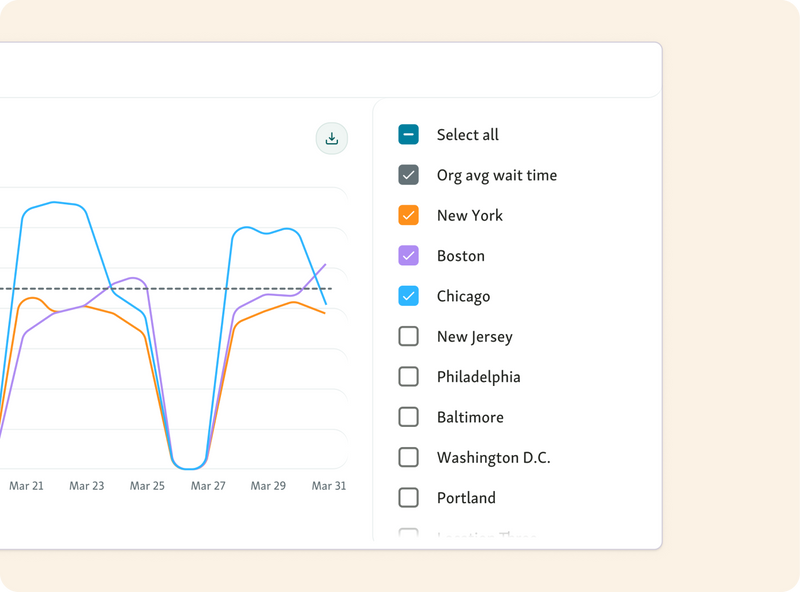
Match staff availability with service demand
Deploy maximum clerks during peak hours identified through data. Schedule breaks and shift changes around demand valleys, not rush periods.
Allow dynamic slot adjustments during peak hours
Enable real-time slot compression, extension, or restriction when demand explodes. Maintains smooth flow during DMV appointment scheduling surges and public-sector chaos.
Challenge 4: Managing High Call Volume for Bookings
High call volume makes appointment scheduling hard for public offices. When citizens must call for every booking or change, staff quickly gets overwhelmed, hold times skyrocket, and tasks that should be simple turn into daily problems.
Why It Happens
This disaster unfolds when call-only systems funnel every scheduling task through overwhelmed front desks. Staff drowns under relentless phone traffic, creating cascading failures, botched details, wrong time slots, incomplete entries multiply. Extended hold times force callers to hang up and redial later, intensifying the flood.
How to Fix It
Escaping phone-based scheduling hell requires migrating to modern, multi-channel appointment scheduling software immediately:
Enable online self-scheduling
Let citizens book, cancel, or reschedule 24/7 without calling anyone. Call volume plummets instantly while staff refocuses on actual service delivery.
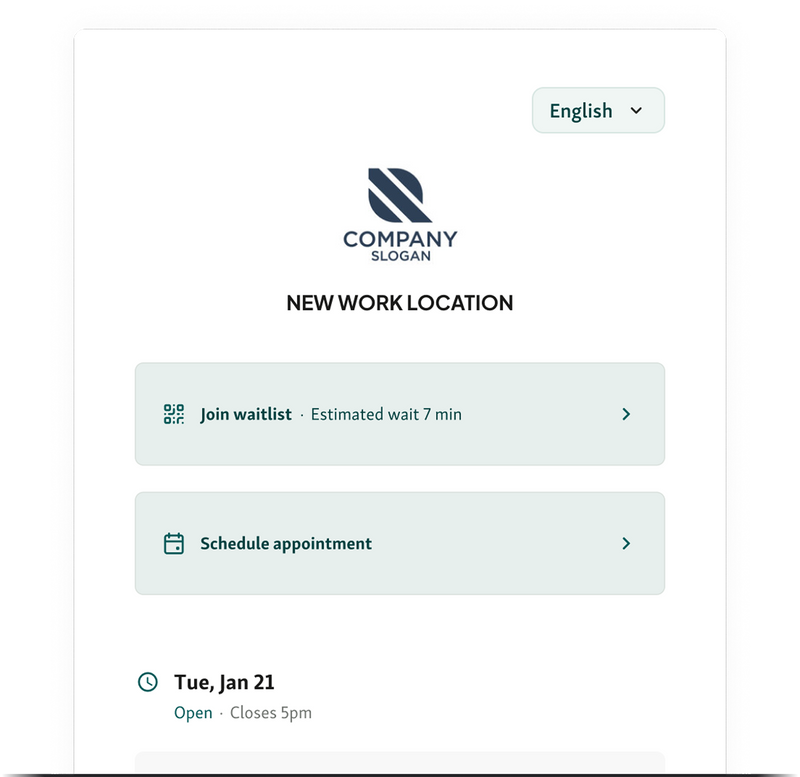
Offer multi-channel booking: web, mobile, kiosk, QR
Citizens choose their preferred scheduling method, website, mobile link, on-site kiosk, or QR code. More channels equals fewer calls jamming lines.
Use automated call deflection to online booking
Deploy phone prompts or SMS responses redirecting callers to digital scheduling. Qminder's self-service tools convert phone addicts to online users automatically.
Provide FAQs to reduce repetitive inquiries
Publish answers to common questions and step-by-step guides online. Staff stops fielding endless "What documents?" or "How do I reschedule?" calls.
Challenge 5: Lack of Real-Time Visibility for Staff and Customers
When neither staff nor customers have a clear view of what’s happening with appointments, confusion spreads fast. People arrive too early or too late, staff scramble to identify who’s next, and delays stack up without warning. In busy public-sector environments, like DMV appointment scheduling, licensing offices, and city service centers, this lack of transparency becomes one of the biggest roadblocks to smooth operations.
Why It Happens
This challenge usually comes from outdated or disconnected tools. Individual departments use separate calendars that don’t sync, front desks update information manually, and staff have no shared view of who arrived, who canceled, or who’s running late. Customers stay in the dark too, since they don’t receive real-time updates or status changes.
How to Fix It
Agencies can restore clarity and control by using modern appointment scheduling software with real-time visibility:
Use centralized dashboards for all staff
A unified scheduling dashboard keeps everyone, clerks, supervisors, and field teams, on the same page. No more separate calendars or version mismatches.
Provide live appointment status to customers
Send real-time updates via SMS or email so citizens know when to arrive, whether delays exist, and what’s happening next.
Integrate scheduling with queue management
When appointment scheduling connects directly with queue check-ins (for example, through systems like Qminder), staff instantly see who has arrived and who still needs processing.
Use analytics to monitor delays in real time
Live wait-time metrics help teams spot bottlenecks early and reassign staff or open extra counters before the lobby backs up.
You might also like - Why Every Government Office Should Use a Service Dashboard
Build a Smarter, More Reliable Appointment System
Public offices run like clockwork when scheduling ditches guesswork for intelligent systems. Double-bookings, no-shows, terrible slot planning, phone meltdowns, and blind operations, every failure bleeds productivity and torches citizen trust.
Modern appointment scheduling software gets rid of these problems using automation, smart communication, and transparent dashboards that unleash staff performance.
Tools like Qminder make this shift even easier with real-time dashboards, automated alerts, and seamless queue integration.
Ready to eliminate delays and modernize scheduling? Try Qminder today.
Agencies crash by transplanting broken workflows into shiny new platforms without fixing underlying problems first. They force ancient, inefficient processes into modern systems expecting magic. Smart agencies map services, appointment types, and staff roles before selecting any platform.
Teams master new systems within one week when training uses actual scenarios instead of abstract features. Hands-on practice sessions, clear operational guidelines, and quick refresher drills build confidence rapidly.
Never completely. Scheduling distributes demand intelligently, but real congestion control requires combining it with digital check-in, live queue updates, and remote waiting features that prevent lobby stampedes.
Get to know our solutions
We will give you a short but great overview of how Qminder can improve your business and visitors experience.
Try out Qminder for yourself and see how we can improve your business and visitors experience.