
Registration is often the first point of friction in any in-person experience. Paper forms, manual sign-ins, and front-desk bottlenecks slow everything down and frustrate visitors before service even begins. QR code–based registration changes that dynamic entirely.
With a simple QR code and a QR code scanner, visitors can complete registration on their own device in seconds, without waiting or filling out repetitive paperwork. QR codes remove the need for shared hardware, reduce errors, and speed up check-in across industries.
As more organizations look to modernize registration, QR code–driven workflows are becoming a practical replacement for traditional processes.
This article explores how QR codes can fully replace manual registration, what changes operationally, and where a QR code scanner delivers the biggest gains in speed, accuracy, and visitor experience.
What Is Traditional Registration
Traditional registration is still common in many organizations and usually relies on manual, staff-driven steps. Visitors arrive, wait their turn, and provide details in ways that are slow and error-prone. Common examples include:
Paper sign-in sheets where visitors handwrite names, reasons for visit, and arrival times, often leading to illegible or incomplete information.
Manual data entry at front desks, with staff retyping visitor details into internal systems, creating delays and duplication of work.
Verbal name collection and token systems, where visitors state their name, receive a paper token, and wait without clear updates or confirmation.
These registration methods work at low volume but struggle to scale, creating bottlenecks, longer wait times, and inconsistent data quality.
Common Problems With Manual Registration
Manual registration creates friction at the very first touchpoint of a visit. What seems simple on the surface often leads to delays, mistakes, and unnecessary stress for both visitors and staff.
Long wait times at entry points
When every visitor must register one by one, lines form quickly, especially during peak hours or shift changes.
Data entry errors and lost information
Handwritten details and manual re-entry increase the chances of misspellings, missing fields, or records going missing altogether.
Privacy concerns with visible sign-in sheets
Names, phone numbers, or visit reasons are often exposed to other visitors, creating clear privacy risks.
Heavy workload for front-desk staff
Staff spend time collecting, typing, and correcting registration details instead of focusing on service and visitor support.
You might also like - How Visitor Websites Can Simplify Pre-Registration and Appointments
Benefits of QR Codes Over Traditional Registration
QR codes remove friction from the very first step of the visit. Instead of forcing everyone through a single registration point, they let visitors register on their own terms using a QR code scanner. This shifts registration from a staff-driven task to a self-serve flow that is faster, cleaner, and easier to scale.
1. Faster Check-In With No Physical Bottlenecks
With a QR code displayed at the entrance, visitors can scan and complete registration in seconds on their own device. There’s no waiting for a clipboard, no standing in line at the front desk, and no dependency on staff availability.

Why this works better than traditional registration:
Instant self-registration
Visitors scan the QR code, fill out the registration form, and are done before they would’ve even reached the desk.
No front-desk congestion
Multiple visitors can register at the same time, even during peak hours.
Fewer delays caused by staff availability
Registration no longer pauses when staff are busy or short-handed.
Example:
In a busy office lobby, traditional registration creates a line as visitors wait to give their name or fill out a form. With QR codes, the same visitors scan a code as they walk in, complete registration while moving to the waiting area, and the entry point stays clear even during rush periods.
Read also - How Staff Can Use Remote Check-Ins to Plan Daily Operations
2. Reduced Staff Workload and Manual Errors
QR codes shift registration work away from the front desk and into a self-serve flow. Instead of staff collecting details verbally or retyping information, visitors enter their own data using a QR code scanner. This makes registration faster and far more accurate.
How this improves on traditional registration:
No manual data entry
Staff no longer need to type names, assign tokens, or manage sign-in sheets.
Fewer errors and corrections
Clear, digital inputs replace rushed handwriting and misheard details.
Less pressure during busy periods
Front-desk teams can focus on helping visitors instead of processing registrations.
Example:
In a manual setup, staff might misspell names or select the wrong service when the line grows. With QR codes, the visitor completes registration themselves, reducing follow-up questions and eliminating most data clean-up later.
3. Contactless and Privacy-Friendly Experience
Using a QR code for registration removes the need for shared surfaces and keeps personal information off public view. Visitors use their own phone and QR code scanner to complete registration, which feels safer and more private than traditional sign-in methods.
How this compares to traditional registration:
No shared touchpoints
Eliminates pens, paper sheets, kiosks, or staff-handled devices.
Better privacy by design
Names, phone numbers, and visit details are entered on the visitor’s own device.
Reduced exposure of personal data
No visible sign-in sheets or overheard conversations at the front desk.
Example:
With a paper sign-in sheet, visitors can see who arrived before them and why. With QR codes, registration happens privately on each phone, protecting personal information while keeping the process fast and simple.
Also read - How Remote Check-In Simplifies Visitor Management
4. Real-Time Queue and Registration Visibility
QR codes turn registration into a live data stream instead of a manual handoff. The moment someone scans a QR code and completes registration, their information is captured instantly and reflected in the system. This gives teams real-time visibility instead of delayed or incomplete updates.
How this improves on traditional registration:
Instant data capture
No waiting for staff to type names in or reconcile paper lists later.
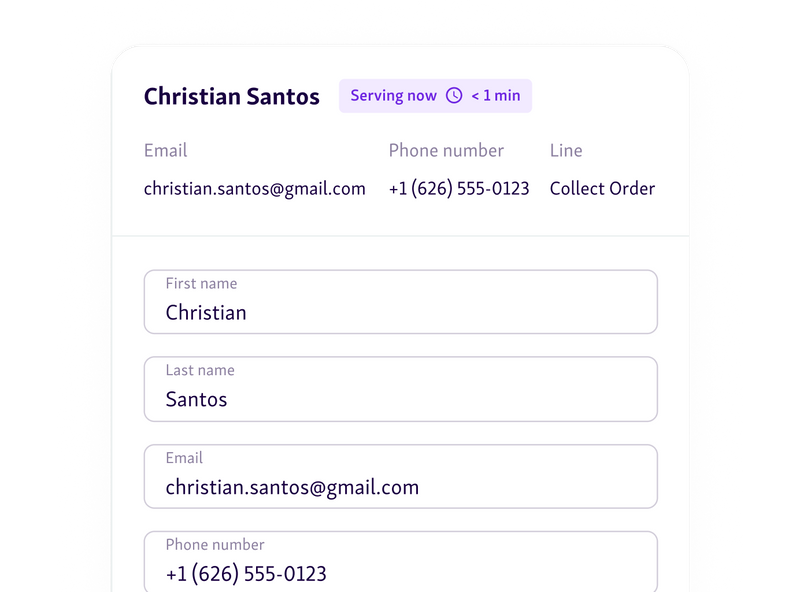
Live view of incoming demand
Staff can see queues forming as they happen, not after they’ve already backed up.
Faster adjustments on the floor
Teams can open more service points or redirect visitors before wait times grow.
Example:
During a busy morning, staff can watch registrations increase in real time and proactively add support. With manual registration, the same issue might only become obvious once the waiting area is already overcrowded.
5. Works Anywhere Without Special Hardware
One of the biggest advantages of using a QR code for registration is how little infrastructure it requires. A printed QR code or a QR code on a screen is enough to get started. Visitors use their own QR code scanner on their phone, which removes the need for dedicated devices at entry points.
How this compares to traditional registration:
No kiosks or tablets to buy or maintain
Registration doesn’t depend on shared hardware that can break, go offline, or need cleaning.
Flexible placement in any environment
QR codes can be added to doors, posters, reception desks, counters, or waiting room TV screens.
Easy to scale or move
If entry points change, you simply move or reprint the QR code instead of reinstalling equipment.
Example:
A clinic places QR codes at the entrance and on a waiting room TV display. Visitors scan and complete registration before reaching the desk, reducing lines without adding a single piece of new hardware.
6. Easy Integration With Digital Queues and Appointments
QR codes become far more powerful when they connect directly to digital queues management systems. Instead of acting as a standalone registration step, the QR code links visitors straight into the flow staff are already managing.
How this improves registration compared to traditional methods:
Direct entry into virtual queues
After scanning the QR code, visitors are automatically added to the correct queue without manual handoff.
Supports both walk-ins and appointments
Walk-in visitors can register on arrival, while scheduled visitors can confirm or check in for existing appointments.
Fewer mismatches between front desk and system data
Because registration feeds the same system staff use, there’s no need to reconcile paper lists or separate tools.
Example:
A visitor with an appointment scans a QR code at the door. The system confirms their booking, checks them in, and places them in the queue instantly, without stopping at the front desk or repeating their details.
7. Better Data for Planning and Optimization
QR code-based registration doesn’t just speed up entry. It also creates cleaner, more useful data the moment someone checks in. Because every scan is digital, organizations capture consistent information without relying on memory, handwriting, or manual entry.
What this enables compared to traditional registration:
Accurate timestamps at every step
Each QR code scans records when visitors arrive, how long they wait, and when service begins.
Clear visibility into visit reasons
Visitors can select why they’re there during registration, improving routing and preparation.
Reliable flow and demand patterns
Over time, scan data reveals peak hours, repeat visits, and service bottlenecks.
Example:
By reviewing QR code registration data, an organization sees that wait times spike every Monday morning for one service type. Staffing is adjusted for that window, reducing congestion without adding extra headcount.
Helpful read - Using Historical Data to Predict Queue Patterns and Improve Operations in Public Services
QR Codes vs Traditional Registration Methods
This comparison highlights how QR codes change the registration experience compared to traditional, manual methods. The focus is on speed, accuracy, effort, and visibility, not just technology.
Aspect | Traditional Registration | QR Code Registration |
Check-in speed | Slow, manual, and dependent on staff availability | Instant scan and submit in seconds |
Front-desk congestion | High during peak hours | Minimal, even at busy entry points |
Data accuracy | Prone to handwriting errors and missed details | Clean, structured digital data |
Privacy | Names and details often visible to others | Information stays on the visitor’s device |
Staff workload | Heavy manual entry and repeat questions | Largely automated with minimal intervention |
Queue visibility | Limited or delayed updates | Real-time insight as scans happen |
Scalability | Breaks down as volume increases | Scales easily with more visitors |
Setup requirements | Paper, printers, or hardware | Just a QR code and a mobile device |
Replace Registration Friction With a System That Scales
Traditional registration breaks down as soon as volume increases. Paper forms slow people down, manual entry creates errors, and front desks become bottlenecks. QR codes remove those pressure points by letting visitors register on their own device, in their own time, with clean data captured instantly.
When QR code–based registration is connected to digital queues and appointments, teams gain real-time visibility and visitors get a faster, calmer entry experience. Less waiting, less staff strain, and better data for planning.
If you want to replace manual registration end to end, Qminder brings QR codes, queues, and visibility together in one system.
See how Qminder can help you modernize registration. Start today.
No. In most setups, a QR code opens a web-based registration page that works directly in the phone’s browser. This keeps the process lightweight and avoids app download friction.
QR-based systems can recognize returning visitors and pre-fill or shorten the registration flow. This makes repeat visits faster while still keeping records accurate and up to date.
Organizations can keep a simple fallback option, such as staff-assisted check-in or a shared device. QR codes reduce manual registration, but they don’t have to eliminate flexibility.
Get to know our solutions
We will give you a short but great overview of how Qminder can improve your business and visitors experience.
Try out Qminder for yourself and see how we can improve your business and visitors experience.