
Improving service efficiency goes beyond hiring armies or building counter fortresses. It starts with decoding what actually happens in your queues.
Queue analytics hands enterprises X-ray vision into how people arrive, wait, move, and complete service journeys. With queue analytics software, teams expose hidden bottlenecks, predict demand tsunamis, and eliminate slowdowns before they torch revenue.
A queue system with analytics transforms random activity into actionable intelligence that directly impacts profits, satisfaction scores, and operational performance.
In this blog, we’ll look at how queue analytics delivers measurable ROI, and why modern enterprises are ditching guesswork for real-time, data-powered decisions.
What is Queue Analytics?
Queue analytics tracks and dissects customer movement through service queues so enterprises can turbocharge speed, efficiency, and experience. Forget guessing why lines jam up.
Queue analytics software delivers real-time and historical data exposing exactly where delays spawn and how to kill them. A queue system with analytics converts daily service chaos into insights that spike performance and slash operational waste.
What gets measured:
Arrival patterns: Peak rush times, hourly/daily/seasonal volume swings
Wait-time behavior: Average waits, peak delay periods, patience thresholds before people bail
Queue length trends: Live and historical views of line expansion and contraction
Service time performance: Staff completion speeds across different tasks or transactions
Abandonment data: Exit points and triggers causing customer walkouts
Queue analytics arms enterprises with visibility to optimize resources, prevent bottlenecks, and make decisions based on data instead of prayer.
The ROI of Queue Analytics for Retail Chains
Queue analytics helps retail chains understand how customers move through their stores, why bottlenecks form, and where revenue leaks happen. With a queue system with analytics, teams can respond faster, plan smarter, and turn long lines into efficient, predictable workflows.
1. Higher Conversions and Reduced Walk-Aways
Queue analytics pinpoints peak crowding, staffing gaps, and turtle-speed service points before customers rage-quit. Teams jump in preemptively. Smooth flow replaces chaos, waits shrink, and people stick around long enough to actually buy something.
Key impacts:
Data-driven scheduling kills congestion by syncing staff presence with actual demand
Real-time queue monitoring alerts managers when wait times go nuclear
Shorter perceived waits keep customers shopping instead of storming out
Example: Major electronics store spotted brutal afternoon lines at their service counter. Queue data revealed the pattern. They deployed one extra associate to that zone during peak hours. As a result, customers stopped abandoning purchases and started completing them.
2. Improved Staff Productivity and Allocation
Queue analytics software shows managers exactly when crowds arrive, how long they stew, and where bottlenecks spawn. Teams plan staffing and task distribution before lines explode instead of scrambling after. Smoother operations emerge, idle hours vanish, and labor budgets actually work efficiently.
Key impacts:
Reveals peak hours so managers reinforce counters before queues attack
Stops overstaffing by exposing when foot traffic dies
Boosts productivity by deploying right staff to right tasks at perfect moments
Example: Store discovers appointment pickups explode at 4 PM. Manager stations trained associates there during that exact window. When traffic dies in the evening, same associate pivots to restocking or processing online orders. Zero waste, maximum impact.
3. Faster Service Time and Higher Throughput
Queue analytics software helps enterprises pinpoint exactly where service slows down, whether it’s at checkout, returns, customer service desks, or specialty counters. By identifying these bottlenecks, stores can streamline workflows, shorten wait times, and move more customers through the system without sacrificing the quality of service.
Key impacts:
Reveals slow steps in the customer journey so teams can fix them quickly.
Boosts throughput by reallocating staff or improving micro-workflows.
Reduces idle time caused by unclear processes or uneven task distribution.
Example: If analytics show that returns take twice as long during evenings, a store can add a second returns lane during those hours or pre-screen items at the entrance so customers reach the counter with everything ready.
4. Better Customer Experience Scores
Queue analytics exposes what customers actually endure, exact wait times, frustration points, and which service areas make them homicidal. With this X-ray vision, retailers fix problem zones fast. Shorter waits, smoother flow, and happier customers who actually come back.
Key impacts:
Slashed wait times boost satisfaction and repeat visits
Friction points causing complaints get eliminated
CX metrics like NPS, CSAT, and review scores climb
Example: Analytics reveal customers lose their minds during pickup because staff hunts for orders like archaeologists. Retailer reorganizes backroom shelving and drops a dedicated pickup assistant into peak hours. Customer experience transforms instantly.
5. Standardized Operations Across All Locations
Queue analytics delivers unified visibility into every store's performance. Regional leaders stop guessing and start seeing which locations drag, why delays happen, and where processes collapse. Standardizing workflows, enforcing service standards, and maintaining consistent customer experiences across the network becomes possible.
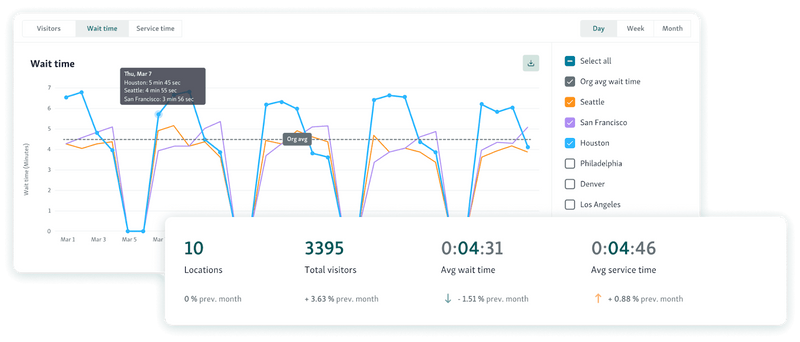
Impact on operations:
Exposes underperforming stores and their specific failure points
Enforces identical service standards region-wide
Early intervention prevents slow service from torching revenue
Example: Analytics expose one branch with nightmare return wait times. Regional manager discovers the pattern, retrains staff, adjusts shifts, or creates dedicated returns lane. That location now matches top performers instead of dragging the brand down.
Read also - How Queue Management Systems Use Multi-Location Insights to Improve Staff Efficiency
6. More Accurate Forecasting and Planning
Queue analytics hands enterprises rock-solid real-time and historical data that makes forecasting actually work. Managers ditch gut feelings and use hard patterns, rush hours, seasonal explosions, service choke points, to make operational decisions that stick.
Impact on planning:
Staffing forecasts become precise by revealing exact demand curves
Training gaps surface when specific tasks repeatedly jam queues
Inventory prep aligns with actual high-traffic days and peak seasons
Example: Queue analytics reveals Friday afternoon check-ins go ballistic every single week. Store schedules extra bodies, stocks more inventory, positions trained veterans at key spots. Former chaos transforms into predictable, manageable workflow.
7. Lower Operational Waste
Queue analytics helps enterprises cut unnecessary costs by showing exactly where resources are being overused, or underused. Instead of guessing how many staff members or counters are needed, managers get clear data on real demand, allowing them to right-size operations without sacrificing service quality.
Impact on waste reduction:
Prevents overstaffing during slow hours.
Reduces idle time at service counters or checkout lanes.
Improves use of space and equipment based on actual traffic patterns.
Example: If analytics shows a certain counter is mostly idle except for a short afternoon rush, the store can reassign staff during quiet periods and activate that counter only when traffic actually calls for it, cutting waste while maintaining smooth service.
Also read - Top Analytics Tools to Improve Visitor Flow in Government Buildings
Key Metrics Retailers Should Track
Understanding the right business performance metrics is what helps retailers improve service speed, reduce walk-outs, and keep every store running smoothly. Here’s a look at the most important ones to monitor.
1. Average Wait Time
Average wait time shows how long customers sit in line before they’re helped. If the wait gets too long, people walk out, complain online, or choose another store next time. Tracking this metric across locations helps you see whether the problem is a one-day issue or an ongoing operational problem that needs fixing.
Formula: Average Wait Time = Total Wait Time ÷ Number of Customers
Example: 600 minutes collective agony, 200 survivors served: 600 ÷ 200 = 3 minutes
2. Service Time per Employee
Service time shows which staff members work quickly and which ones get stuck on certain tasks. The numbers reveal training gaps, complicated steps, or areas where someone may need support. Managers can use this data to adjust workloads and improve flow without overloading anyone.
Formula: Service Time per Employee = Total Service Minutes ÷ Customers Served
Example: Worker burns 240 minutes processing 40 humans: 240 ÷ 40 = 6 minutes per head
3. Customer Walk-Away Rate
Walk-away rate counts how many people leave before they’re served. Every walk-out means lost revenue today and possibly a lost customer forever. When this number increases, it shows exactly where your process is breaking down or taking too long.
Formula: Walk-Away Rate (%) = (Customers Who Left ÷ Total Queue Entries) × 100
Example: 25 flee from 300 entries: (25 ÷ 300) × 100 = 8.3%
4. Peak Traffic Hours
Peak traffic analysis shows when crowds consistently show up. These patterns repeat daily or weekly, making it easier to prepare staff before rush hours hit. With better coverage during busy times, stores turn stressful rushes into smooth, profitable periods.
How to Calculate: Clock arrivals hourly, identify volume explosions.
Example: 180 bodies noon-2 PM signals red alert requiring all hands deployed.
5. Queue Length Trends
Queue trends show how lines grow and shrink throughout the day. This helps catch issues early, like when lines start building faster than teams can serve. If the same spikes happen every day, it’s a sign that you need long-term operational fixes, not quick band-aids.
How to Calculate: Sample queue depth regularly, map evolution patterns.
Example: 3→12 customer surge at 4 PM demands scheduled reinforcements.
6. Location-Based Performance Variations
Comparing locations based performance shows which stores are performing well and which ones are falling behind. The data shows whether the problem is with a single location, a region, or the whole network. High-performing stores can serve as models to help improve the ones struggling.
How to Calculate: Compare identical KPIs, flag deviation outliers.
Example: Store A: 4 minutes. Store B: 9 minutes. B operates 125% worse, requires immediate rehabilitation.
Related read - Customer Satisfaction Metrics You Need to Be Tracking
How to Implement Queue Analytics in Retail
Queue analytics becomes effective only when it’s rolled out in a structured, step-by-step way. Let’s walk through the key steps that make the rollout smooth and scalable across multiple stores.
Step 1: Start With a Single Queue System Across All Stores
Launch operations by deploying a queue management software like Qminder everywhere so data flows uniformly from every location. Mismatched systems create comparison nightmares and worthless analytics that mislead instead of inform. Unified platforms slash training complexity while keeping your data pristine and actually useful for decisions.
Step 2: Add Virtual Queuing for Busy Locations
High-traffic stores desperately need virtual queuing to prevent lobby mobs and harvest behavioral intelligence before customers physically arrive. Phone-based joining spreads arrivals throughout operating hours instead of crushing you with synchronized rushes. This technology transforms guesswork into precise demand forecasting while keeping customers happy.
Step 3: Train Teams to Use Queue Dashboards
Analytics don’t matter if staff don’t know how to use them. Teams should be trained to recognize rising wait times, overload warnings, and moments when action is needed. When employees understand the signals, they can fix issues quickly without waiting for a manager’s approval.
Step 4: Review Data Weekly and Monthly
Weekly reviews help catch new problems early, such as sudden delays, staffing gaps, or broken workflows. Monthly reviews reveal bigger patterns—like recurring slowdowns or predictable rush hours—that require long-term solutions. Using both views keeps daily operations smooth while improving the entire system over time.
Step 5: Use Findings to Adjust Staffing and Layout
Once patterns become clear, managers can make smart changes based on real data. This can include adjusting staff shifts, adding more counters during peak hours, or redesigning the service flow. Queue analytics show exactly where friction occurs, making improvements faster, cheaper, and more reliable.
You might also like - How to Use Footfall Analytics to Improve Customer Service
Queue Analytics Pays Off Quickly for Retailers
Queue analytics hands retailers a direct route to spiking conversions, eliminating traffic jams, optimizing staffing, and making customers actually enjoy shopping again.
Tracking the right metrics and acting on live insights means stores slash walk-aways, accelerate throughput, and maintain rock-solid performance everywhere. It's the rare operational upgrade that simultaneously boosts revenue while cutting costs.
Tools like Qminder simplify everything with built-in queue analytics, real-time dashboards, and multi-location reporting that actually makes sense.
Try Qminder today and watch the transformation happen.
No. Queue analytics runs perfectly on tablets, hijacks your existing POS infrastructure, or lives in cloud dashboards you access from anywhere. Kiosks and digital signage help mega-stores manage chaos but smaller shops skip them entirely without losing functionality.
Results hit fast, usually within weeks. Better staff deployment, vanishing walk-aways, and accelerated service immediately spike daily revenue while operational costs plummet simultaneously.
Definitely. Queue platforms marry with loyalty databases, exposing how wait times drive repeat business, purchase patterns, and lifetime value metrics that matter.
Get to know our solutions
We will give you a short but great overview of how Qminder can improve your business and visitors experience.
Try out Qminder for yourself and see how we can improve your business and visitors experience.