
Enterprises manage a high volume of visitors every day, from clients and partners to contractors and interview candidates. Without the right visitor management system, tracking arrivals, maintaining security, and ensuring a smooth check-in experience becomes difficult.
Many organizations still rely on manual processes that slow teams down and create gaps in visibility. Modern visitor management systems help enterprises control access, improve compliance, and deliver a better first impression at scale.
Choosing the best visitor management system means finding a solution that supports complex workflows, multiple locations, and real-time oversight.
In this blog, we’ll review the top-rated visitor management system for enterprises and highlight what to consider when comparing leading platforms.
TL;DR (Quick Comparison Table)
This table offers a concise overview of leading visitor management systems, focusing on core strengths, ratings, and pricing to support quick evaluation.
Tool | Core Strength | G2 Rating | Pricing |
Digital queues, real-time visibility, analytics | 4.6 | From $789/mo (14-day trial) | |
Setmore | Appointment scheduling | 4.5 | Free / From $5/mo |
Vizitor | Digital check-in and queue control | 4.1 | From $36/mo |
Skiplino | Remote queuing and arrival control | 4.5 | From $300/mo |
Wavetec | Queues, kiosks, and visitor feedback | 4.8 | On request |
Acuity Scheduling | Online booking and calendar control | 4.7 | From $16/mo |
NextMe | Touchless mobile queues | 5.0 | Free / From $49.99/mo |
Qwaiting | Structured ticket-based queuing | 4.7 | On request |
Qnomy | Workflow-driven routing and orchestration | 4.3 | On request |
Qtrac | Dynamic queue routing across large facilities | 4.7 | On request |
10 Best Visitor Management Systems for Enterprises
Choosing the right visitor management system is critical for enterprises that handle high visitor volumes, multiple locations, and strict security requirements. Below is a curated list of visitor management systems designed to support scalability, visibility, and operational control across enterprise environments.
1. Qminder
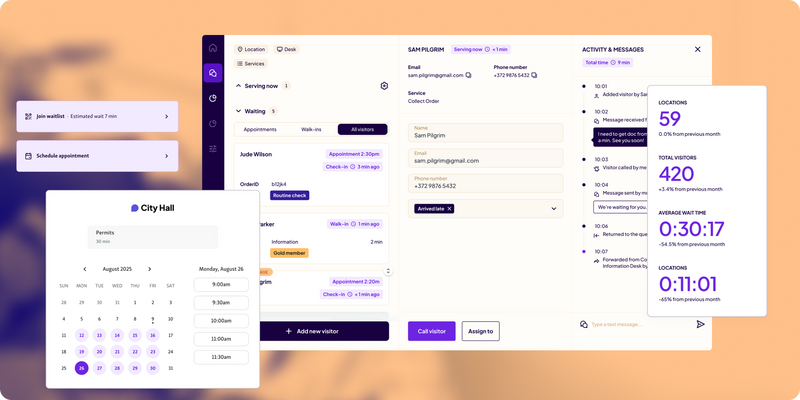
Qminder is a top-rated visitor management system for enterprises that need to manage visitor flow at scale without adding complexity. It replaces manual check-ins and physical lines with a digital queue, giving visitors a smoother experience while giving teams full visibility into demand across locations.
As a visitor management system, Qminder allows visitors to check in using kiosks, mobile devices, or a web browser. Once checked in, visitors receive real-time updates about their place in line, reducing uncertainty and crowding. For enterprise teams, the platform provides a clear view of wait times, service load, and bottlenecks across all locations, making it easier to allocate staff and improve throughput.
Qminder is well suited for organizations that need a visitor management system that balances simplicity for visitors with strong operational insight for teams.
Key features:
Appointment scheduling and walk-in check-in in a single visitor management system
Multi-channel check-in via kiosk, mobile, or browser
Real-time SMS and app notifications for queue updates
Centralized queue management across multiple enterprise locations
Detailed tracking of wait times, service times, and visitor flow
Reporting and analytics to support staffing and performance decisions
Integrations with CRM and scheduling tools
Pros:
Easy for visitors and staff to use
Strong analytics for enterprise-level planning
Scales well across multiple locations
Cons:
May be more advanced than needed for very small or single-provider teams
G2 rating: 4.6
Pricing: 14-day free trial available. Paid plans start at $789/month.
2. Setmore

Setmore is a lightweight visitor management system combined with appointment scheduling, designed for teams that need a simple and affordable way to manage bookings. It works best for smaller offices and growing organizations that want basic visitor coordination without the complexity of enterprise-heavy visitor management systems.
As a visitor management system, Setmore focuses primarily on scheduled visits rather than high-volume, on-site visitor flow. It allows organizations to create branded booking pages and lets visitors schedule appointments online at any time. Integrations with social platforms also make it easier for customers to book without additional staff involvement, improving accessibility across channels.
Key features:
Free plan supporting unlimited appointments for up to four users
Customizable booking pages with branding options
Appointment booking through websites, Facebook, and Instagram
Zapier integrations with tools like Google Contacts and Mailchimp
Built-in payment processing via Square, Stripe, or PayPal
Pros:
Easy to set up and manage
Cost-effective for small and growing teams
Cons:
Limited visitor intake and on-site management features
Free plan supports one-way calendar sync only
G2 rating: 4.5
Pricing: Free for up to four users. Paid plans start at $5/month, with added automation and advanced integrations for expanding teams.
3. Vizitor

Vizitor is designed for organizations that need to manage a steady flow of visitors across offices, campuses, or large facilities. It focuses on replacing manual sign-in processes with a digital check-in and queue flow that scales beyond a single front desk.
Visitors can register using a mobile device, tablet, or browser, often through QR codes or one-time verification. Once checked in, they receive live updates on their position in the queue, which reduces congestion at entry points and reception areas. For enterprise teams, the system provides real-time visibility into visitor volume and movement, helping staff direct people to the right department without manual coordination.
Key features:
Digital visitor check-in via mobile, tablet, or QR code
Real-time queue status updates through SMS or app notifications
Automated token assignment across departments
Central dashboard for monitoring visitor flow and wait times
Nightly queue reset and token management
Cloud-based access for multi-location oversight
Pros:
Straightforward experience for visitors and front-desk teams
Handles high visitor volumes across departments effectively
Cons:
Larger enterprise deployments may require onboarding support
Limited customization options on lower-tier plans
G2 rating: 4.1
Pricing: Starts at $36/month.
4. Skiplino

Skiplino is built for environments where visitor volume is high and service order needs to stay predictable. It’s commonly used in large offices, government buildings, and service centers where unmanaged foot traffic can quickly turn into bottlenecks.
Instead of forcing everyone to show up and wait, Skiplino lets visitors join a queue or book a time slot remotely using a mobile app or a simple link. This shifts congestion away from reception areas and gives organizations better control over how many people arrive at once. Visitors receive live updates through SMS or app notifications, so they know exactly when to approach the service point rather than waiting on-site.
Key features:
Remote queue joining and appointment booking via mobile app or web link
Real-time SMS and app notifications with queue status updates
Central dashboard to manage multiple queues and service lines
Built-in analytics with CRM integrations for performance tracking
Centralized reporting across branches and locations
Pros:
Works well in high-traffic, fast-moving environments
Helps reduce congestion and maintain orderly visitor flow
Cons:
Performance depends on a stable internet connection
Pricing may be high for smaller teams or low-volume offices
G2 rating: 4.5
Pricing: Plans start at $300/month.
5. Wavetec

Wavetec is designed for enterprises that deal with heavy, continuous visitor traffic and need more than basic check-in or queue control. It combines visitor flow management with engagement and feedback, making it a fit for large organizations where experience and efficiency need to scale together.
Visitor entry is flexible. People can book or check in through kiosks, web links, or messaging channels like WhatsApp, which lowers friction and meets visitors where they already are. Inside the location, digital signage keeps queues visible and visitors informed, reducing confusion and repeated inquiries.
Key features:
WhatsApp-based booking and check-in for faster visitor engagement
Digital signage with real-time queue and status updates
SMS and WhatsApp feedback collection during or after visits
Self-service kiosks for check-in, billing, and document printing
Central dashboards tracking satisfaction levels and service trends
Pros:
Scales effectively across large, multi-location organizations
Combines visitor flow and feedback in one system
Cons:
Kiosk rollouts require planning in large deployments
Feedback configuration can extend initial setup time
G2 rating: 4.8
Pricing: Available on request.
6. Acuity Scheduling

Acuity Scheduling focuses on appointment control rather than full visitor flow management. It is commonly used by public-facing offices and teams that need a reliable way to reduce walk-ins by moving demand into scheduled time slots.
The platform supports recurring appointments, intake forms, and advance payments, making it useful for organizations that rely heavily on structured bookings. Integrations with calendar, video, and accounting tools help teams connect scheduling with existing workflows.
Key features:
Online appointment booking with a clean, easy-to-use interface
Recurring appointments and customizable intake forms
Integrations with Google Calendar, Zoom, QuickBooks, and other tools
“Look Busy” setting to control visible staff availability
Mobile apps for both staff and visitors
Pros:
Fast to deploy and simple to manage
Strong ecosystem of third-party integrations
Cons:
No free plan available
Limited customization for booking pages and on-site visitor flow
G2 rating: 4.7
Pricing: Plans start at $16/month for one user and one location.
7. NextMe
NextMe takes a minimal, touchless approach to visitor flow by focusing almost entirely on walk-in traffic. Instead of kiosks or front-desk check-ins, visitors join a queue from their own phones and wait in a virtual waiting room until they are called.
The system is designed to reduce physical crowding and keep reception areas clear. Visitors receive SMS alerts when it is their turn, while organizations can share basic information, updates, or messages inside the virtual waiting experience.
Key features:
Touchless mobile check-in with real-time queue tracking
Virtual waiting room that can display updates or messages
Automated SMS alerts when visitors are ready to be served
Basic reporting for daily and weekly activity
Integrations with POS and loyalty platforms
Pros:
Easy to deploy with no hardware required
Free plan available for low-volume use
Cons:
Branding options are limited to paid plans
Free version does not support multi-location enterprise needs
G2 rating: 5
Pricing: Free plan includes 100 SMS messages per month. Paid plans start at $49.99/month.
8. Qwaiting

Qwaiting is a cloud-based queue management platform designed for organizations that need to manage high volumes of visitors across counters, branches, or service desks. It is commonly adopted in regions where structured, ticket-based queuing is essential for keeping operations predictable and orderly.
The platform replaces paper tokens with digital queue management. Visitors can join a queue remotely or on arrival using kiosks, mobile devices, or web check-in. Once registered, they receive real-time updates through SMS, WhatsApp, or email, reducing the need to wait near service counters.
Key features:
Appointment booking combined with virtual queuing
Staff-controlled queue calling via keypads or desktop interfaces
Live queue displays and digital signage
Multi-language support with configurable branding
Cloud-based access for managing multiple branches
Pros:
Easy to use for both visitors and staff
Real-time reporting supports operational improvements
Cons:
Customization options vary by pricing tier
Mobile experience may slow down in very high-volume environments
G2 rating: 4.7
Pricing: Available on request.
9. Qnomy
Qnomy is built for large enterprises that need deep control over complex, multi-step service journeys. Rather than focusing only on queues, it connects front-desk intake with internal operations, making it suitable for organizations where multiple teams, service types, and priorities must work together.
The platform supports skill-based routing and custom workflows, allowing enterprises to mirror real operational processes instead of forcing a one-size-fits-all queue. Because of this depth, Qnomy is often considered by organizations looking for the best visitor management system for highly structured environments.
Key features:
End-to-end visitor flow spanning intake, service handling, and completion
Skill-based routing to assign visitors to the most appropriate staff
Custom workflows aligned with internal processes and service rules
Centralized appointment scheduling across multiple service types
Interaction tracking across kiosks, virtual touchpoints, and digital channels
Pros:
Well suited for enterprises with complex, multi-department operations
Flexible workflow configuration without heavy development work
Cons:
Initial setup can require time and specialist support
Interface may feel complex for teams used to simpler systems
G2 rating: 4.3
Pricing: Available on request.
10. Qtrac
Qtrac is built for organizations that need tight control over complex visitor movement across large facilities. It is designed for environments with multiple service points, departments, or buildings where visitors may need to be redirected mid-journey without restarting the process.
Visitors can join a queue through SMS, QR codes, kiosks, or scheduled appointments, then track their status remotely instead of waiting in crowded areas. For front-desk teams, Qtrac provides tools to pre-screen visitors, assign them to the right service, and reroute them in real time as capacity or priorities change.
Key features:
Dynamic queue rerouting to move visitors between departments without restarting
Real-time notifications when wait times exceed defined thresholds
Greeter mode to screen and assign visitors at entry points
Offline operation to keep queues moving during outages
Centralized dashboards for managing multiple entrances or buildings
Pros:
Well suited for large facilities with multiple service touchpoints
Enables fast redirection based on demand or availability
Cons:
Greeter-based workflows may require staff training
Offline mode is limited and may sync with delays once reconnected
G2 rating: 4.7
Pricing: Available on request.
You might also like - 10 Best Customer Service Analytics Platforms for Public Sector Agencies
Choose a Visitor Management System That Scales With Your Enterprise
Enterprises need more than basic check-in tools. The right visitor management system should handle high volumes, support multiple locations, and give teams clear visibility into visitor flow and operations.
Choosing the best visitor management system comes down to how well it fits your operational complexity, security needs, and growth plans. A top-rated visitor management system for enterprises should reduce friction for visitors while giving teams better control and insight.
Qminder stands out by combining simplicity, scalability, and real-time visibility across locations.
Start your free trial with Qminder today.
Deployment time depends on the system’s complexity and the number of locations involved. Some platforms can be rolled out in days for a single site, while enterprise-wide implementations may take several weeks to align workflows, permissions, and reporting.
Beyond front-desk or operations teams, enterprises should involve IT, security, compliance, and facilities teams. This ensures the visitor management system aligns with data policies, infrastructure requirements, and long-term operational goals.
Most modern visitor management systems offer integrations with tools like identity management, scheduling platforms, analytics software, and internal dashboards. Integration capabilities are especially important for enterprises looking to centralize data and avoid siloed systems.
Get to know the author

Aleksandra Sõsun Product Marketing Lead at Qminder
Get to know our solutions
We will give you a short but great overview of how Qminder can improve your business and visitors experience.
Try out Qminder for yourself and see how we can improve your business and visitors experience.