
Remote check in has quietly changed how teams handle check in and daily operations, especially in busy service environments.
Instead of waiting for people to arrive before reacting, staff can now see demand forming ahead of time and plan daily operation tasks with far more confidence.
When customers check in remotely, teams gain early visibility into volume, timing, and service needs, which removes a lot of the guesswork from daily operations. It affects how staff schedules are set, how counters are staffed, and how priorities are decided throughout the day. Small adjustments made early can prevent stress later.
In this blog, we’ll look at how remote check in works in practice, how staff use it to stay ahead of demand, and why it’s becoming a key part of smarter daily operations planning.
What is Remote Check In?
Remote check in allows customers to check in for a service before they physically arrive at a location. Instead of standing in line or waiting at the front desk, people can check in from their phone or browser and see their place in line in real time. This changes how check in works by shifting it from a physical moment to a digital one.
For staff, remote check in creates early visibility into the day’s workload. Teams can see who is coming, when they are likely to arrive, and what service they need. That insight helps daily operations run smoother because planning starts before the doors even open.
How Remote Check-Ins Help Staff Plan Daily Operations
Remote check-in gives teams a clearer picture of what the day will look like before the first customer walks in. Instead of guessing, staff can plan daily operations using real check in data that shows demand, timing, and service needs in advance.
1. Understand Expected Demand Before the Day Starts
Remote check in gives staff early insight into who is coming in, when they plan to arrive, and what they need help with. This visibility makes daily operations easier to plan because teams are no longer guessing or waiting for walk-ins to show up before reacting.
Staff can see the volume of upcoming check ins and the types of services requested
Managers can adjust schedules, counters, or room availability before peak times hit
Teams can prepare documents, tools, or systems needed for the day’s workload
Daily operations become smoother because demand is visible hours in advance
Example: If a public office sees a high number of remote check-ins scheduled for mid-morning, staff can add coverage early and prevent long waits instead of dealing with a sudden rush at the counter.
2. Balance Workloads Across Staff and Service Counters
Remote check in helps managers see where demand is building before people physically arrive. Instead of reacting to long lines at one counter while another sits empty, staff can plan daily operations with a clearer picture of how work should be shared.
Upcoming check ins show which services will be busiest and which will be lighter
Managers can assign staff to the right counters ahead of time
Service queues stay balanced, reducing stress on individual employees
Daily operations feel more controlled instead of chaotic during peak hours
Example: If remote check in data shows most visitors need licensing services, managers can shift staff from quieter desks to that counter before the rush begins, keeping wait times steady across the floor.
3. Identify Peak Hours and Prepare for Surges
Remote check in data makes it easier to spot patterns in daily operations before things get hectic. When staff can see when people are planning to arrive, they can prepare for busy periods instead of scrambling once lines form.
Check in trends highlight which hours attract the most visitors
Teams can stagger breaks so coverage stays strong during rushes
Extra staff can be scheduled only when demand actually spikes
Daily operations stay steady instead of swinging between slow and overwhelmed
With service intelligence in Qminder, these patterns are easy to see at a glance. Staff can review peak hours, compare them to previous days, and adjust schedules with confidence, making surge planning part of the routine rather than a last-minute fix.
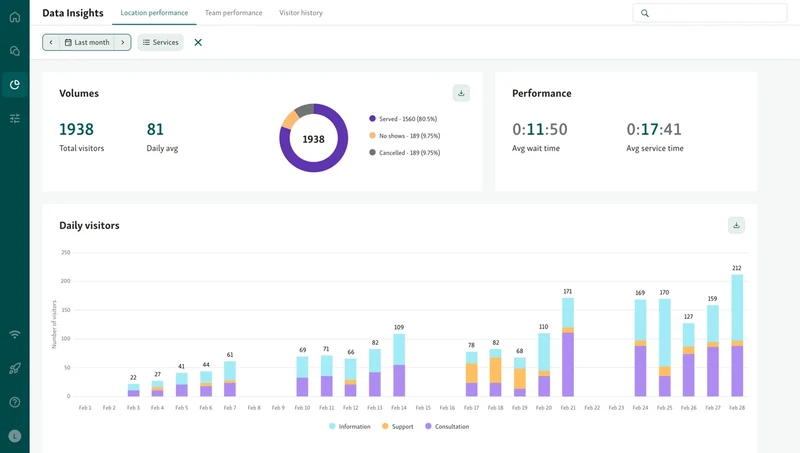
Example: If a sudden spike in remote check ins hits one service mid-morning, a supervisor can immediately move a staff member from a quieter counter to that service, preventing delays before visitors even notice a problem.
Also read - How Local Governments Can Use Data-Driven Insights to Improve Queue Flow and Citizen Satisfaction
4. Prioritize Visitors Based on Service Type or Urgency
Remote check in gives staff the context they usually only get once someone reaches the counter. When visitors check in ahead of time, their reason for visit and urgency are already visible, which helps teams plan daily operations more deliberately.
Check in details show what type of service each visitor needs before they arrive
Urgent or time-sensitive cases can be flagged and handled first
Complex requests can be routed to experienced staff instead of slowing down the line
Routine visits move faster because they’re grouped and processed together
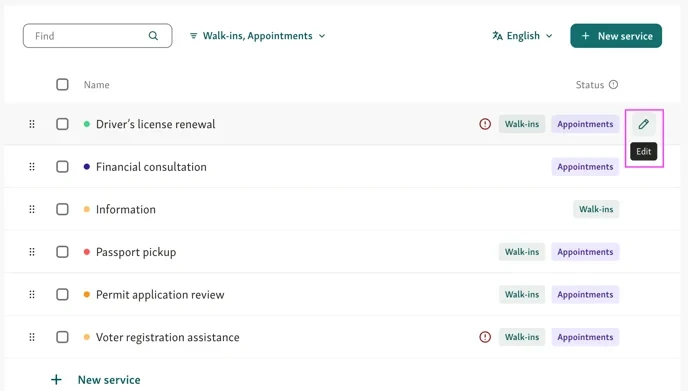
This approach creates a fairer flow where visitors are served based on need, not just arrival time, and daily operations feel more organized instead of reactive.
Example: Staff see urgent cases and quick requests before visitors arrive, route them to the right team, and keep daily operations moving without slowing the entire line.
5. Reduce Front-Desk Congestion and Manual Intake
Remote check in removes a big chunk of the bottleneck that usually forms at the front desk. When visitors complete their check in before arriving, staff don’t have to spend the first few minutes of every interaction collecting basic details or explaining next steps.
Fewer people lining up just to check in or ask where to go
Less manual data entry and fewer errors during busy periods
Staff can focus on guiding visitors, answering real questions, and handling edge cases
Walk-ins and pre-registered visitors move through daily operations more smoothly
With tools like Qminder’s remote sign-in and self-check-in flows, visitors can join the line from their phone or a kiosk, while staff manage everything from one place instead of juggling paperwork at the counter.
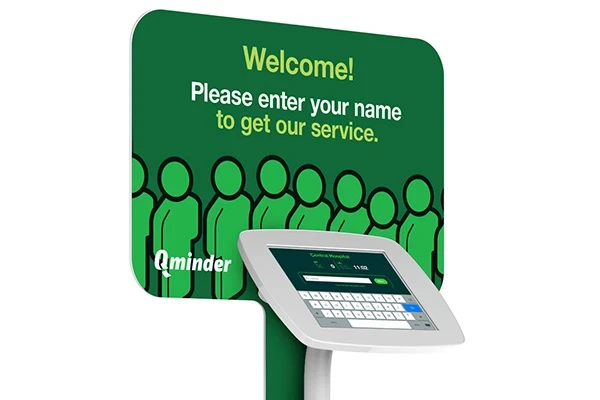
Example: Visitors check in remotely, skip the front desk, and staff focus on guidance instead of paperwork, keeping daily operations smooth even during busy periods.
Also read - 8 Self-Service Kiosk Platforms That Help Cut Wait Times
6. Adjust Staffing in Real Time Using Live Queue Data
Remote check in doesn’t just help with planning ahead. It also gives teams the ability to react as the day unfolds. When staff can see live arrivals and queue buildup, they can adjust daily operations before small issues turn into long waits.
Monitor check in activity and queue length as it happens
Spot services or counters getting overloaded in real time
Reassign staff or open additional counters without guesswork
Keep wait times balanced across services during unexpected surges
With Qminder’s real-time dashboard, staff get a clear, live view of who has checked in, where queues are growing, and what needs attention next.

Example: If a sudden spike in remote check ins hits one service mid-morning, a supervisor can immediately move a staff member from a quieter counter to that service, preventing delays before visitors even notice a problem.
7. Improve Communication With Visitors Before Arrival
Remote check in helps staff communicate early, which removes a lot of uncertainty before the visit even begins. Instead of handling questions at the counter, teams can guide visitors through check in ahead of time and keep daily operations predictable.
Automated SMS alerts confirm check in and acknowledge the visitor
Status updates share estimated wait times and reduce guessing
Arrival instructions explain where to go and what to prepare
Fewer missed appointments because expectations are clear
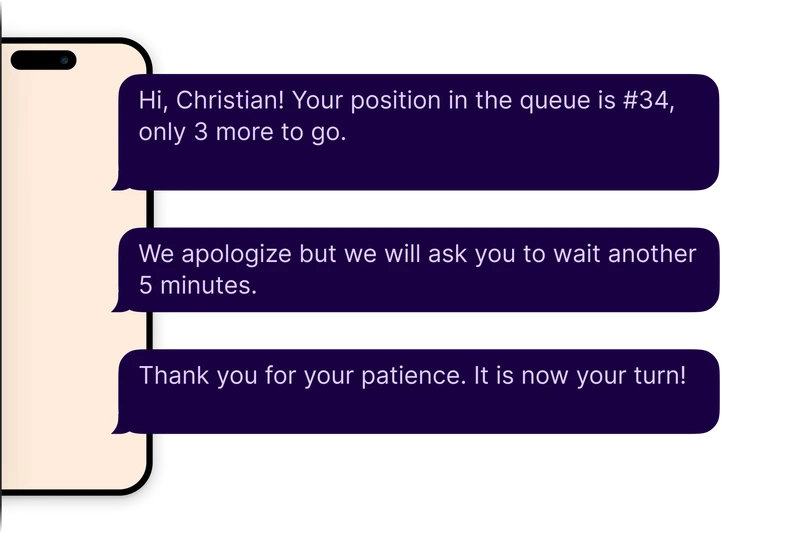
Example: A visitor completes a remote check in from home, receives an SMS update with their wait time and arrival window, and shows up ready. Staff avoid last-minute questions, lines stay shorter, and daily operations run smoother instead of feeling rushed.
8. Use Historical Check-In Data to Plan Future Shifts
Remote check in doesn’t just help with today’s daily operations, it gives teams a record they can learn from. By reviewing past check in activity, managers can spot patterns that make staffing and appointment scheduling decisions far more accurate instead of relying on guesswork.
Historical check in data shows which days and times consistently get busy
Service analytics highlight which services create the most demand
Reporting reveals where staff coverage was too light or unnecessarily heavy
Shifts, opening hours, and resources can be adjusted before problems repeat
Example: If service analytics show that remote check ins spike every Monday morning for a specific service, managers can add coverage in advance. Daily operations feel calmer, staff workloads stay balanced, and visitors experience smoother check in without last-minute scrambling.
Helpful read - How Remote Check-In Simplifies Visitor Management
Turn Remote Check-Ins Into Smarter Daily Operations
Remote check in gives teams the visibility they’ve always needed to run daily operations with confidence. When staff can see who’s coming, why they’re visiting, and when demand will peak, planning stops being reactive.
Workloads stay balanced, front desks stay clear, and visitors move through check in with less confusion and frustration. Over time, historical check-in data helps teams fine-tune staffing, schedules, and service flow so each day runs smoother than the last.
Tools like Qminder make this practical with remote sign-in, real-time dashboards, and service intelligence built for staff.
See how Qminder can help you plan smarter daily operations.
Yes, in a good way. Staff spend less time on basic intake and more time helping visitors who need guidance, clarification, or special handling during daily operations.
Remote check in systems update arrival status in real time, so staff can adjust the queue without disrupting daily operations or forcing rigid appointment rules.
Absolutely. Remote check in works well for walk-ins, first-come services, and mixed service models, giving teams better control over daily operations without forcing strict scheduling.
Get to know the author

Aleksandra Sõsun Product Marketing Lead at Qminder
Get to know our solutions
We will give you a short but great overview of how Qminder can improve your business and visitors experience.
Try out Qminder for yourself and see how we can improve your business and visitors experience.