
A waiting room tv does more than fill silence. It shapes how people experience time, sets expectations, and quietly communicates how organized your operation really is. In a tv waiting room, screens can either calm people down with clear information or make frustration worse if the content feels random or outdated.
Choosing the right waiting room tv display isn’t about buying the biggest screen or looping generic content. It’s about understanding what your visitors need while they wait and how that information supports staff behind the scenes.
From queue updates and announcements to branding and wayfinding, a well-set-up waiting room tv helps reduce questions, lower stress, and keep things moving.
This guide breaks down how to choose a waiting room tv system that actually works in real, busy environments.
Top Features to Look for in a Waiting Room TV System
A good waiting room tv system does more than play content. It gives visitors useful, timely information that reduces uncertainty and helps staff manage flow with fewer interruptions. The right features turn a waiting room tv display into a practical service tool, not just a screen on the wall.
1. Real-Time Queue and Wait Time Display
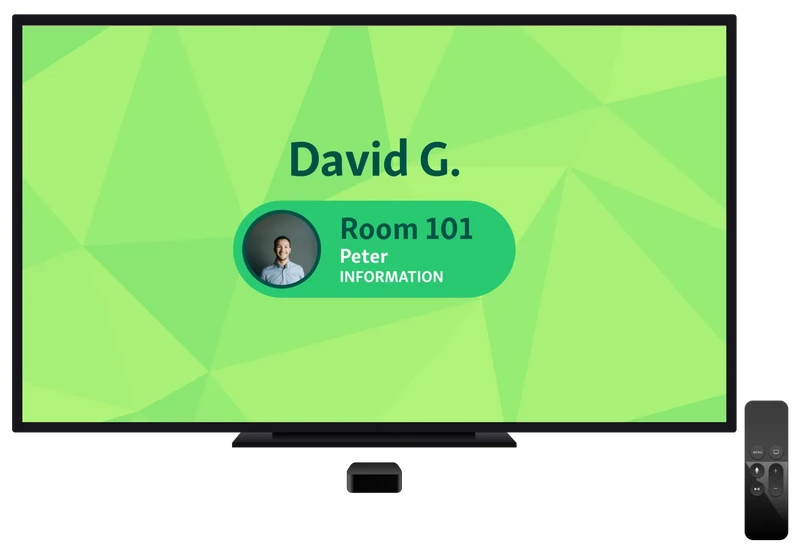
Showing live queue and wait time information on a waiting room tv display removes uncertainty from the waiting experience. When people know what’s happening, they feel more in control and are far less likely to interrupt staff for updates.
How this feature helps in practice:
Reduces anxiety: Clear progress updates make waits feel fair and predictable.
Builds trust: Visitors can see that the queue is moving and they haven’t been forgotten.
Cuts repeat questions: Staff spend less time answering “How long will it be?”
Improves flow: People arrive at the service point more smoothly when they know when their turn is coming.
Example:
In a busy service center, a tv waiting room screen shows the current ticket being served, the next few in line, and estimated wait times. Visitors glance at the screen instead of approaching the desk, staff stay focused on service, and the waiting area feels calmer even during peak periods.
Also read - How to Enhance Your Customer Waiting Room Experience
2. Easy Content Customization
A waiting room tv system should be simple to update without relying on IT or external vendors. When staff can quickly change what appears on a tv waiting room display, communication stays accurate and relevant as conditions shift throughout the day.
How this feature helps in practice:
Faster updates: Messages can be changed instantly when services, hours, or processes change.
Clear guidance: On-screen instructions reduce confusion about check-in steps or required documents.
Better use of screen space: Layouts can balance queue info, announcements, and helpful reminders.
Less staff interruption: Visitors get answers visually instead of asking the front desk.
Example:
If a service desk temporarily closes or a document requirement changes, staff update the waiting room tv display in minutes. Visitors see the new instructions immediately, avoiding confusion and unnecessary back-and-forth at the counter.
3. Integration With Queue or Appointment Systems
A waiting room tv works best when it’s directly connected to your queue or appointment system. Without integration, displays rely on manual updates, which quickly fall out of sync with what staff are actually managing behind the scenes.
Why integration matters:
Accurate, real-time information: Queue positions and wait times update automatically as staff serve visitors.
No manual errors: Eliminates the risk of outdated or incorrect numbers being shown.
Consistent experience: What visitors see on the waiting room tv display matches exactly what staff see on their dashboard.
Less staff effort: Teams don’t need to manage screens separately from queues or appointments.
Example:
In a busy service center, a visitor checks in and sees their number appear instantly on the tv waiting room screen. As soon as a staff member calls the next person, the display updates automatically, keeping everyone aligned without extra work.
4. Support for Multiple Locations and Screens
A waiting room tv system should be easy to manage across multiple screens and locations. For organizations with several branches or large waiting areas, consistency matters just as much as flexibility.

Why this feature matters:
Centralized control: Update content and queue displays across all tv waiting room screens from one place.
Consistent messaging: Ensure the same instructions, branding, and service updates appear in every location.
Location-specific views: Show different queues or messages per branch while using the same system.
Scales without extra effort: Adding new screens or locations doesn’t require rebuilding workflows.
Example:
A multi-location clinic uses one system to manage waiting room tv displays across all branches. Head office updates service instructions once, while each location’s screen shows its own live queue and wait times automatically.
You might also like - How Queue Management Systems Use Multi-Location Insights to Improve Staff Efficiency
5. Accessibility and Language Support
A good waiting room tv system should be designed for everyone in the room, not just the most tech-savvy visitors. Clear visuals and language options help reduce confusion and make information easier to follow at a glance.
Why this feature matters:
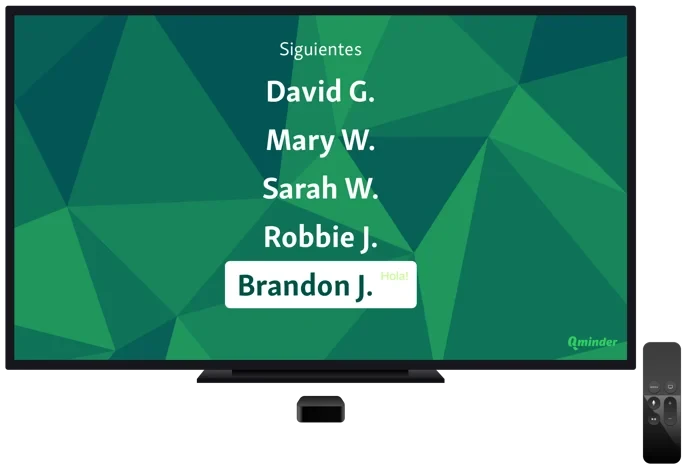
Readable layouts: Large text, high contrast, and simple layouts make waiting room tv displays easy to read from a distance.
Clear visual hierarchy: Visitors can quickly spot queue numbers, wait times, and instructions without scanning the whole screen.
Multilingual support: Showing messages in multiple languages helps serve diverse communities more effectively.
Inclusive experience: Better accessibility reduces frustration for older visitors, non-native speakers, and first-time visitors.
Example:
A public service office uses a tv waiting room display that cycles between English and Spanish. Queue numbers stay large and clear, while instructions appear in both languages, helping visitors understand what to do without asking staff.
6. Minimal Hardware and Setup Requirements
The best waiting room tv systems don’t rely on specialized or expensive hardware. When a tv waiting room setup works on standard screens and runs through the cloud, it’s much easier to deploy and manage.
Why this feature matters:
Works with standard TVs: No need for proprietary displays or custom-built screens.
Faster setup: Cloud-based systems can be configured and launched without complex installs.
Lower ongoing costs: Fewer devices mean less maintenance and fewer points of failure.
Easier scaling: Adding another waiting room tv display is as simple as connecting a new screen.
Example:
A clinic mounts standard TVs in its waiting area and connects them to a cloud-based waiting room tv system. When the clinic expands to a second floor, staff add new screens in minutes without extra hardware or IT support.
7. Reliability and Uptime
A waiting room tv system is only useful if it works consistently. In busy environments, even short screen outages can cause confusion, missed turns, and repeated questions at the front desk.
Why this feature matters:
Consistent service flow: Screens stay in sync with live queue and appointment data.
Fewer staff interruptions: Visitors don’t need to ask what’s happening when displays stay online.
Trust and clarity: Reliable waiting room tv displays reinforce that the system is accurate and fair.
Built for peak hours: Stable performance matters most when demand is highest.
Example:
During a lunch-hour rush, a waiting room tv continues updating queue positions in real time. Because the display never goes offline, visitors follow the flow smoothly and staff avoid managing confusion manually.
How Waiting Room TV Systems Improve the Visitor Experience
A well-designed waiting room tv system does more than display information. It shapes how visitors feel while they wait and how smoothly your space operates.
Reduced perceived wait time
When visitors can see live progress on a waiting room tv display, waiting feels more manageable. Even if the actual wait doesn’t change, transparency helps reduce frustration and impatience.
Clear next steps for visitors
A tv waiting room screen shows who is being called, where to go, or what to do next. This removes uncertainty and helps people move confidently through the space without needing assistance.
Fewer questions directed at staff
Real-time updates answer common questions before they’re asked. Staff spend less time repeating the same information and more time focused on service delivery.
Calmer, more organized waiting areas
Consistent, easy-to-read messaging creates order. Visitors understand what’s happening, which reduces tension and keeps the waiting room running smoothly.
Helpful read - How Retail Chains Use Waiting Room TVs to Improve In-Store Experience
Evaluating Cost vs. Value
When choosing a waiting room tv system, cost should be viewed over time, not just at purchase. Legacy systems often rely on upfront licenses, custom hardware, and ongoing maintenance contracts that quietly increase total spend as locations scale.
Modern, cloud-based options work differently. Platforms like Qminder use a subscription model with no installation or maintenance fees. Hardware costs are flexible too. A waiting room tv display can run on existing screens or even a visitor website, bringing hardware cost to zero in some setups. When dedicated devices are used, the estimate is closer to $1,000 per location, far lower than traditional systems.
The real value shows up operationally. Clear tv waiting room information reduces staff interruptions, lowers perceived wait time, and keeps visitors informed. Those efficiency gains often deliver more value than the monthly cost itself.
Choose a Waiting Room TV System That Actually Helps People Wait Better
A good waiting room tv system does more than fill silence or display generic content. The right setup reduces uncertainty, lowers perceived wait times, and takes pressure off staff by answering questions before they’re asked.
Features like real-time queue updates, easy content control, system integrations, accessibility support, and reliable uptime all work together to create calmer, more organized waiting areas. When you evaluate cost, focus on total value, not just upfront pricing. Flexible hardware, minimal maintenance, and clear ROI matter far more over time.
If you want a waiting room tv display that connects directly to real service data and scales without hassle, Qminder is built for exactly that.
See how Qminder can improve your waiting experience and get started today.
Yes. Many organizations use waiting room TV screens to share educational content, policy reminders, health tips, or temporary announcements, making the wait more informative instead of passive.
In most setups, front-desk managers or operations teams handle updates. Modern systems are designed so non-technical staff can make changes without relying on IT support.
A well-designed system adapts in real time, updating wait estimates and messaging automatically so visitors stay informed even when demand spikes suddenly.
Get to know the author

Aleksandra Sõsun Product Marketing Lead at Qminder
Get to know our solutions
We will give you a short but great overview of how Qminder can improve your business and visitors experience.
Try out Qminder for yourself and see how we can improve your business and visitors experience.